Text messages from Travel Nurse Houses
Program: Travel Nurse Houses account and booking alerts. Sent by Travel Nurse Houses, operated by Blueinc Technologies, Inc.
What we text
- Sign-in and phone verification codes, when you ask for one.
- Alerts when a message, housing request or reservation request to you has gone unanswered, if you turn text alerts on.
- Notices about your account and bookings.
We never send marketing or promotional texts.
How you opt in
Texting is optional and is not a condition of using Travel Nurse Houses. You opt in in two places, both shown here as they appear in your account.
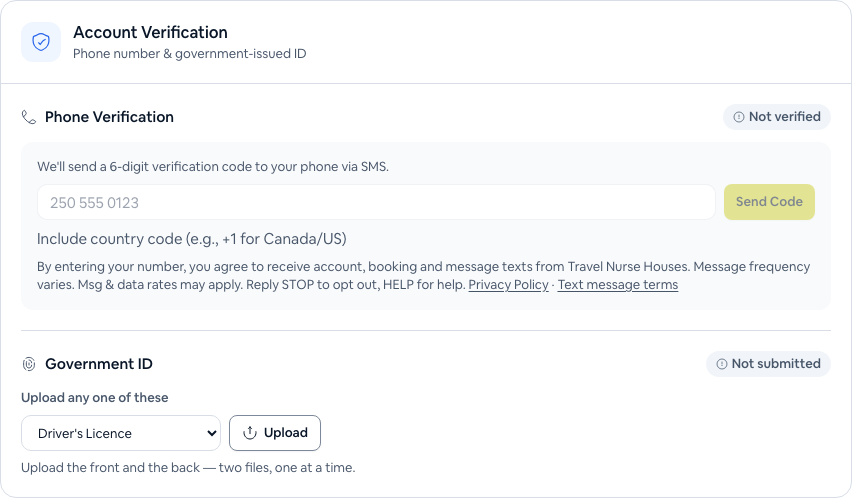
1. Adding and verifying your mobile number
In Verification, during host set-up, before accepting a reservation, or when signing in with your phone, you enter your number and we text you a code. This line is shown directly under the number field:
By entering your number, you agree to receive account, booking and message texts from Travel Nurse Houses. Message frequency varies. Msg & data rates may apply. Reply STOP to opt out, HELP for help.
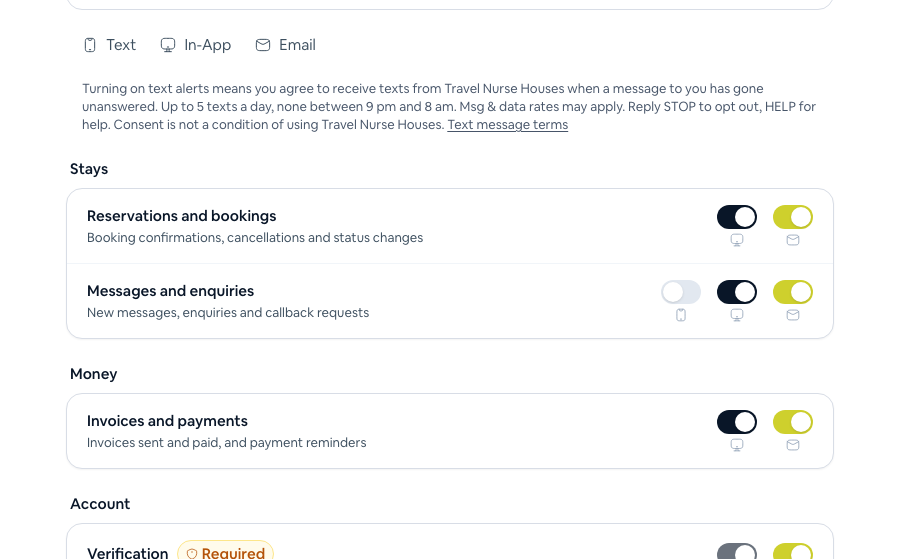
2. Turning on text alerts
Alerts are off until you switch them on yourself, one kind at a time, in Notification settings, with a verified number. This is shown beside the switches:
Turning on text alerts means you agree to receive texts from Travel Nurse Houses when a message to you has gone unanswered. Up to 5 texts a day, none between 9 pm and 8 am. Msg & data rates may apply. Reply STOP to opt out, HELP for help. Consent is not a condition of using Travel Nurse Houses.
The confirmation you receive
The first time you turn text alerts on, we send:
Travel Nurse Houses: you are signed up for text alerts about messages and bookings. Up to 5 msgs/day. Msg & data rates may apply. Reply HELP for help, STOP to opt out.
How often
Message frequency varies with your activity. Alerts: at most 5 a day, and none between 9 pm and 8 am local time. Codes arrive when you ask for one. Message and data rates may apply.
Stopping and getting help
- Reply STOP (or STOPALL, UNSUBSCRIBE, CANCEL, END or QUIT) to any text to stop all texts. You can also turn alerts off in Notification settings.
- Reply START to opt back in. We reply: “Travel Nurse Houses: you are opted back in. Text STOP at any time to stop.”
- Reply HELP for help. We reply: “Travel Nurse Houses: alerts about messages you have not answered. Text STOP to opt out, START to opt back in. Support: support@travelnursehouses.ca”
Carriers are not liable for delayed or undelivered messages.
Examples
- Travel Nurse Houses: A traveler is waiting for your response about a housing request. Please log in to TNH to reply. Reply STOP to opt out.
- Travel Nurse Houses: your sign-in code is 482913. It expires in 10 minutes. Do not share it.
Your number and your privacy
No mobile information is shared with third parties or affiliates for marketing or promotional purposes, and text-message opt-in data and consent are never shared with any third party. See our Privacy Policy (section 2.11A) and Terms and Conditions (section 1.10).
Contact us
Questions about texts: support@travelnursehouses.ca